Hydration In Reactjs
10 min readWhat is Hydration in React?
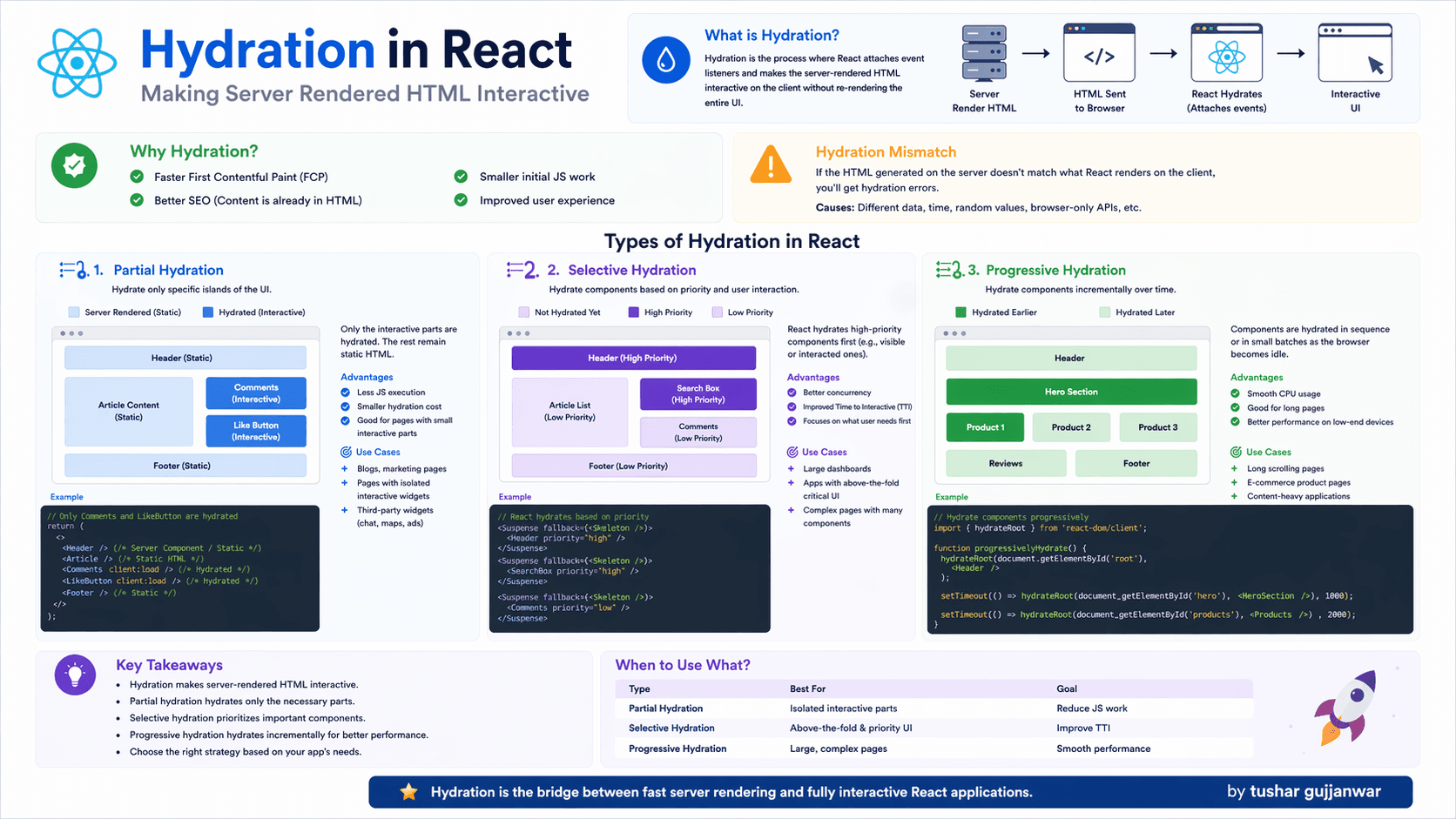
Hydration is the process where React attaches event listeners to server-rendered HTML and makes it interactive — without re-rendering the entire UI.
In simple words: Server sends HTML → React makes it alive in browser
Hydration Flow
- 1. Server renders HTML
- 2. HTML sent to browser
- 3. React loads JS
- 4. React attaches events → Hydration
- 5. UI becomes interactive
Why Hydration?
- Faster initial load (SSR)
- Better SEO
- Improved UX
- Less JS work initially
Hydration Mismatch ⚠️
Happens when server HTML ≠ client render output
SSR vs CSR vs Hydration
SSR (Server-Side Rendering)
HTML is generated on the server and sent to the browser.
CSR (Client-Side Rendering)
Browser builds UI using JavaScript after load.
Hydration
React attaches events to SSR HTML to make it interactive.
Hydration Lifecycle (Deep Dive)
- Server renders HTML using React components
- Browser receives static HTML (fast display)
- React JS bundle loads
- React compares DOM with virtual DOM
- Event listeners are attached
- UI becomes interactive (hydrated)
Types of Hydration in React
Partial Hydration
Only specific components are hydrated.
- Less JS execution
- Faster load
Selective Hydration
Hydration based on priority.
- High priority first
- Better TTI
Progressive Hydration
Hydration happens step by step.
- Smooth performance
- Better for large apps
Real-World Use Cases of Hydration
E-commerce
Product page loads fast with SSR, then buttons become interactive.
Blogs
SEO-friendly content loads instantly, interactions added later.
Dashboards
Critical UI loads first, charts hydrate later.
Landing Pages
Fast first paint + interactive forms after hydration.
Hydration in Next.js (Real Example)
Next.js automatically handles hydration when using SSR.
// pages/index.js
export default function Home() {
  return <h1>Hello from SSR</h1>;
}
Server sends HTML → React hydrates automatically in browser.
Manual Hydration (React 18)
import { hydrateRoot } from "react-dom/client";

hydrateRoot(
  document.getElementById("root"),
  <App />
);
This tells React to attach events instead of re-rendering.
Hydration vs Re-render
Hydration
Attaches events to existing HTML (no UI rebuild)
Re-render
React updates UI based on state/props changes
Common Hydration Mistakes
- Using random values (Math.random)
- Using Date/time directly in render
- Accessing window/document on server
- Conditional rendering mismatch
- Different API data on server vs client
Hydration Mismatch Problem
// ❌ BAD
const time = new Date().toLocaleTimeString();

// server vs client mismatch
❌ Server & client output differ → hydration error
// ✅ FIX
useEffect(() => {
  setTime(new Date().toLocaleTimeString());
}, []);
How to Avoid Hydration Errors
- Use useEffect for client-only logic
- Avoid non-deterministic values in render
- Keep server & client output same
- Use dynamic import (ssr: false) when needed
- Check browser APIs before using
Next.js Hydration Optimization Tips
- Use dynamic imports for heavy components
- Split components (code splitting)
- Use Suspense boundaries
- Avoid unnecessary client-side state
- Prefer Server Components when possible
Hydration is expensive if overused. Modern React (especially with Next.js App Router) reduces hydration by using Server Components — meaning less JavaScript, faster apps, and better performance.
Key Takeaways
- Hydration makes SSR interactive
- Improves SEO & performance
- Mismatch is common bug
- Next.js handles it automatically
Hydration = Bridge between SSR and interactivity 🚀
Ready to Level Up Your React Game? 🚀
Learning patterns is just the beginning. The real growth happens when you apply them in real-world problems.
If you want to go deeper and build production-level React skills, check out these practical guides 👇
Keep Exploring 👇
If you found this useful, you might enjoy these related reads as well:
More patterns, more clarity, better code.
Don’t just learn React… build like a pro.